
Install the app
How to install the app on iOS
Follow along with the video below to see how to install our site as a web app on your home screen.
Note: This feature may not be available in some browsers.
This board is now closed. The Blackhole image ended in 2020.
The board will remain available in Read Only Mode, so all the posts from the last 15+ years are not lost.
We thank you for being part of the community for the last 15+ years.
You can join the OpenBh board if you have not already done so at www.openbh.net.
- Home
- Forums
- Black Hole (Archive)
- Blackole Support (Discontinued)
- Vu+ HD Receiver Black Hole Images
- Vu+ Solo2 Black Hole Images
You are using an out of date browser. It may not display this or other websites correctly.
You should upgrade or use an alternative browser.
You should upgrade or use an alternative browser.
2 vusolo 2 in the same room
- Thread starter zottya
- Start date

Matrix10
Administrator
Hi.This is possible?I have a problem with remote control.
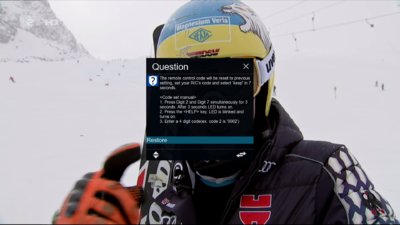
Start with Green Button >> Plugin Remote Control Code Settings
For one BOX you have to change Remote Control to 3
Now
Very quickly you have to change the code on the remote
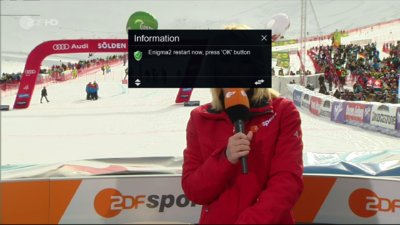
and go down in list to restart.
==========================================
If you have universal remote
You can change the system code of your Vu+ universal remote
Press <<2+7>>, Press <Help>,Press <0001 or 0002 or 0003 or 0004>
1. Press 2 and 7 for three seconds until LED is on.
2. Press Help
3. Press 0001 for mode 1, 0002 for mode 2,0003 for mode 3
==========================================
Try a couple of times until you get it / learn
Last edited:
Matrix10
Administrator
I tried this, but not working.This method disable my remote control and not working.
For me works
I tested a few minutes ago.
AFTER Code change on your remote
you have to
( wait 2-3 sec and go down in list to restart box )
Matrix10
Administrator
Ok.I made it .I choose KEEP in message windows.That was the problem .Thanks.
Do not forget if you re install/install new image
you have to restore remote code 2 on your remote
Or use another remote to setup again in plugin.