Follow along with the video below to see how to install our site as a web app on your home screen.
Note: This feature may not be available in some browsers.
This board is now closed. The Blackhole image ended in 2020.
The board will remain available in Read Only Mode, so all the posts from the last 15+ years are not lost.
We thank you for being part of the community for the last 15+ years.
You can join the OpenBh board if you have not already done so at www.openbh.net.
I would like to have the finished timers automatically removed from the timer list. There isn't any setting in the menu, at least I haven't found any. I am aware of the manual way in OpenWeb, there is a button "Cleanup timers" in the timers menu, but I would like to have this process automated.
A cron job came to my mind initially, but there is no predefined command and I am not aware of the script to delete the old timers.
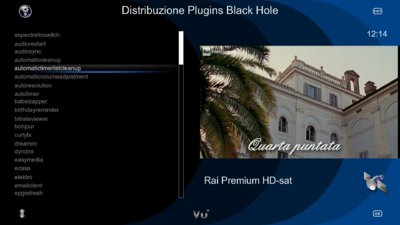
This is not a BH standard feature as for OBH, for instance. You need the showed plugin. Actually, I think it's a waste of RAM as you can choose, within the customization menu, to put the completed timers on top of the list and then you can remove them all just by pressing BLUE once entered the timer list.
Thank you, this solved it. Having an addon is the perfect solution. It's not consuming resources for people that don't need the functionality. And for people like me who wants to automate nasty tasks, it' there.
This site uses cookies to help personalise content, tailor your experience and to keep you logged in if you register.
By continuing to use this site, you are consenting to our use of cookies.