Follow along with the video below to see how to install our site as a web app on your home screen.
Note: This feature may not be available in some browsers.
This board is now closed. The Blackhole image ended in 2020.
The board will remain available in Read Only Mode, so all the posts from the last 15+ years are not lost.
We thank you for being part of the community for the last 15+ years.
You can join the OpenBh board if you have not already done so at www.openbh.net.
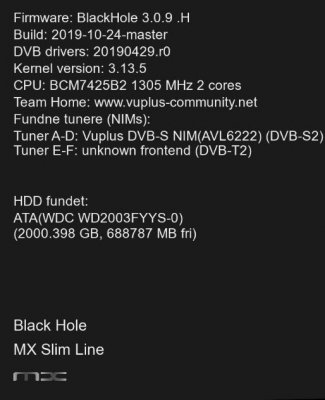
I have Blackhole 3.0.9.H on my Vu Ultimo 4k. The info bar always shows there`s an online update available when there isn`t. This week I saw on here, that 3.0.9.I, was available. So I went through the online update when finished, it said 2 packages had been installed, but the image still shows as 3.0.9 H and the info bar still shows there`s an online update available. But nothing changes.
root@vuuno4kse:~# opkg update
Downloading http://feeds.vuplus-community.net/3rd-party-settings/Packages.gz.
Inflating http://feeds.vuplus-community.net/3rd-party-settings/Packages.gz.
Updated list of available packages in /var/lib/opkg/official-3rd-party-settings.
Downloading http://feeds.vuplus-community.net/3.0.9/vuuno4kse/all/Packages.gz.
Inflating http://feeds.vuplus-community.net/3.0.9/vuuno4kse/all/Packages.gz.
Updated list of available packages in /var/lib/opkg/official-all.
Downloading http://feeds.vuplus-community.net/3.0.9/vuuno4kse/armv7ahf-vfp-neon/Packages.gz.
Inflating http://feeds.vuplus-community.net/3.0.9/vuuno4kse/armv7ahf-vfp-neon/Packages.gz.
Updated list of available packages in /var/lib/opkg/official-armv7ahf-vfp-neon.
Downloading http://feeds.vuplus-community.net/3.0.9/vuuno4kse/vuuno4kse/Packages.gz.
Inflating http://feeds.vuplus-community.net/3.0.9/vuuno4kse/vuuno4kse/Packages.gz.
Updated list of available packages in /var/lib/opkg/official-vuuno4kse.
root@vuuno4kse:~#
had seen an update notice, I have the H version,
I have updated and always see H version, on this forum I see that the "I" version is available, but I do not have this update, and it is not updated. it will be nice for you, I really don't care how death was, but I would be curious ...
I did the opkg list_upgradable and I get the message " Not selecting python ~ requests 2.9.2 as installing it would break existing dependencies". I still see the "Online Update Available" on the info bar but does not change from H to I
Now it shows " Not selecting python ~ requests 2.9.2 as installing it would break existing dependencies" and "Package python requests ( 2. 12. 4-r0 ) installed in root is up to date"
the same on Duo2 (remains on BH3.0.9.H)
(i think i have the most from .I , but the info is showing .H)
What i did was…..
While i was on .H (Before the .I was released)
Shortly before the .I was released (hours/minutes before), I looked for updates and there was 30+/40+ packages to update.
Then the .I was released.
I updated again and there was 2 packages to update.
But info was/is still showing BH3.0.9.H
Which are the two packages? If you want to know them, use telnet and give the command
opkg update && opkg upgrade
And, above all: it's your image installed in flash or in multiboot? Because usually the two components not updatable are the openmultiboot ones if you try to update the image in multiboot: it can't be done because they are already running.
Otherwise, copy and paste the telnet output to that command.
This site uses cookies to help personalise content, tailor your experience and to keep you logged in if you register.
By continuing to use this site, you are consenting to our use of cookies.