
This board is now closed. The Blackhole image ended in 2020. The board will remain available in Read Only Mode, so all the posts from the last 15+ years are not lost. We thank you for being part of the community for the last 15+ years. You can join the OpenBh board if you have not already done so at www.openbh.net.

Flickering picture with HDMI

pscl

Vu+ Newbie
When connecting my Solo2 to my TV (Philips 32PF7321 supporting 1080i at 50Hz and 60Hz) I have flickering purple bands on the screen, flashing every half a second or so. I tried all possible A/V settings to no avail. I also obviously tried with two different HDMI cables. The frequency at which the bands flash changes when switching between 50Hz and 60Hz, hence I assume this is a problem related to the resolution/refresh rate. Is there any way to finely tune these settings? I am running BlackHole 2.0.7.1.
Any help will be appreciated (and apologies if this question has already been answered in another thread).
 
When connecting my Solo2 to my TV (Philips 32PF7321 supporting 1080i at 50Hz and 60Hz) I have flickering purple bands on the screen, flashing every half a second or so. I tried all possible A/V settings to no avail. I also obviously tried with two different HDMI cables. The frequency at which the bands flash changes when switching between 50Hz and 60Hz, hence I assume this is a problem related to the resolution/refresh rate. Is there any way to finely tune these settings? I am running BlackHole 2.0.7.1.
Any help will be appreciated (and apologies if this question has already been answered in another thread).

You have try to change to FIX 50 Hz
 
You have try to change to FIX 50 Hz
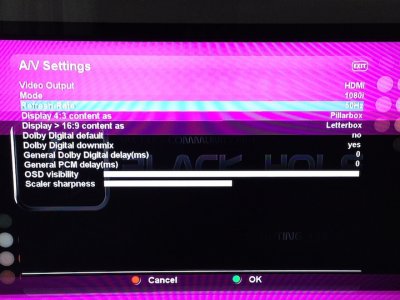
Thanks for the suggestion. I tried with both 50 Hz and 60 Hz. Here is what I observe with 50 Hz (see photo below). Purple stripes are moving down the screen. With 60 Hz, they move much faster but there is the same problem. Interestingly, the Solo2 works fine with another TV (also via HDMI), and the TV works fine with a game console (also via HDMI). That's why I assume it might be possible to fix the problem by tuning some of the A/V settings.
photo.JPG
 
Back
Top