Follow along with the video below to see how to install our site as a web app on your home screen.
Note: This feature may not be available in some browsers.
This board is now closed. The Blackhole image ended in 2020.
The board will remain available in Read Only Mode, so all the posts from the last 15+ years are not lost.
We thank you for being part of the community for the last 15+ years.
You can join the OpenBh board if you have not already done so at www.openbh.net.
Hi every one
I have a router with sharing function and FTP access via USB port .
Now I want to use FTP between router(FTP)and vu+
But I can't reach the files in USB(on router USB port)
But I can access any media files on USB with black hole media player .
(In media player ican see my shared folder)
But icant access any ipk or other format of files and I dono where it is .
Is there any FTP browser software available for vu+ ?
Or something like that ?
On both - on your router and on Vu+ are configured ftp servers, not clients. I do not understood this
"But I can't reach the files in USB(on router USB port)
But I can access any media files on USB with black hole media player ." - you can't reach files on USB, but you can access them
If you want to access files with Vu+ from other ftp's, you must google for "enigma2 ftp client plugin" for your architecture. Or I think there is ftpget in enigma2, but may be I'm wrong - I don't check this
Hello again.
I try many different ways to do this
And finally find the way .
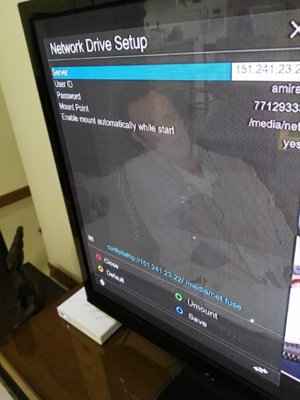
There is a file browser in plugins . when you run it you can see network mount like the picture.
But beforeyou should mount it at plugins ->netdrive
Yes, it is a samba mount (analogous to the Windows "Network Neighborhood"). But I recommend NFS mount - it is faster, what is relevant for larger broadcast traffic. For this you must install and configure NFS server on your computer, configure it and mount as NFS (not CIFS) on your STB. If I'll find a free time, I'll try to write how-to about NFS mounts, because in our How-to's found only CIFS mount tutorial.
This site uses cookies to help personalise content, tailor your experience and to keep you logged in if you register.
By continuing to use this site, you are consenting to our use of cookies.