
Install the app
How to install the app on iOS
Follow along with the video below to see how to install our site as a web app on your home screen.
Note: This feature may not be available in some browsers.
You are using an out of date browser. It may not display this or other websites correctly.
You should upgrade or use an alternative browser.
You should upgrade or use an alternative browser.
Geniatech T230 USB DVT-T Tuner and OBH 5.0
- Thread starter spearkie
- Start date

nunigaia
Moderator
Hello everybody,
i downloaded the driver for the above mentioned tuner and also activated it on the image
BUT
there is not even one channel tuning. (i even made a new channel search, but no channel found)
Does anybody know why ?
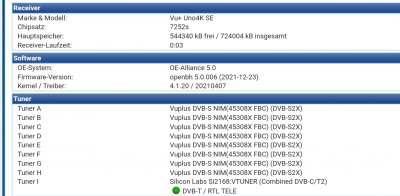
Can you please post more info´s about your device?
- As for example -> debug -> https://vuplus-community.net/board/...-per-le-immagini-bh-et-obh.21512/#post-281000
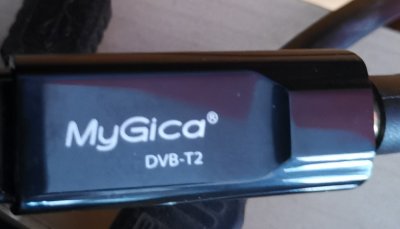
- Foto -> are you sure, that you have installed the driver that your device needs?
nunigaia
nunigaia
Moderator
Ok, i go back to 4.4 or change to another image. i understand that my problem was not interesting for a feedback.
Funny, I asked you on 4/02/2022 the same day you posted your issue, and you answered after 3 days 7/02/2022 ...
Have you been busy, those days?
I have been, probably as you, this is an hobby, remember!
Don´t be rude stay calm, and be cool

Maybe we can help, in order to solve your issue!
Though, you are using an UNO4K SE and trying to get MYGICA DVB-T2 Tuner seted, and running OpenBH 5.0, right?
Where, you have also, a FBC tuner, and a Vuplus Turbo ( First Edition )?
best regards
nunigaia
Hello nunigaia,
Yes, i understand that all this is a hobby, i posted after installing the debug script, i didn't want to give you an incomplete answer. That's why it took 3 days.
And after a week without any feedback, i thought that it interests nobody.
Back to the problem:
Yes, i am trying on uno4kse, the turbo tuner connected was deactivated for running my tests. I even uninstalled it in order to only have the t230 geniatech connected.
Same tuning problem with the geniatech tuner on a zero4k.
Another old hauppage dvb-t tuner works on that zero4k, but showing snr = 0.
The problems appeared with openbh version 5.0, they did not exist with 4.4.
Best regards
Spearkie
Yes, i understand that all this is a hobby, i posted after installing the debug script, i didn't want to give you an incomplete answer. That's why it took 3 days.
And after a week without any feedback, i thought that it interests nobody.
Back to the problem:
Yes, i am trying on uno4kse, the turbo tuner connected was deactivated for running my tests. I even uninstalled it in order to only have the t230 geniatech connected.
Same tuning problem with the geniatech tuner on a zero4k.
Another old hauppage dvb-t tuner works on that zero4k, but showing snr = 0.
The problems appeared with openbh version 5.0, they did not exist with 4.4.
Best regards
Spearkie

el bandido
Vu+ User
Have you reloaded 4.4 to verify this tuner still works correctly with that image?
I don't have the geniatech tuner, but a check of the drivers and firmware show they are loading and seem to be installed correctly:
root@sf8008:~# opkg install kernel-module-dvb-usb-cxusb
Package kernel-module-dvb-usb-cxusb-4.4.35 (4.4.35-32) installed in root is up to date.
root@sf8008:~# opkg install kernel-module-dvb-usb-dvbsky
Package kernel-module-dvb-usb-dvbsky-4.4.35 (4.4.35-32) installed in root is up to date.
root@sf8008:~# opkg install kernel-module-si2168
Package kernel-module-si2168-4.4.35 (4.4.35-32) installed in root is up to date.
root@sf8008:~# opkg install kernel-module-si2157
Package kernel-module-si2157-4.4.35 (4.4.35-32) installed in root is up to date.
root@sf8008:~# opkg install firmware-dvb-fe-si2168
Package firmware-dvb-fe-si2168 (1.0-r0) installed in root is up to date.
Also check and make sure you have the correct firmwares installed in /lib/firmware of receiver files:
-rw-r--r-- 1 root root 2728 Feb 13 05:50 dvb-demod-si2168-02.fw
-rw-r--r-- 1 root root 28656 Feb 13 05:50 dvb-demod-si2168-a20-01.fw
-rw-r--r-- 1 root root 18888 Feb 13 05:50 dvb-demod-si2168-a30-01.fw
-rw-r--r-- 1 root root 15827 Feb 13 05:50 dvb-demod-si2168-b40-01.fw
-rw-r--r-- 1 root root 204 Feb 13 05:50 dvb-demod-si2168-d60-01.fw
From the way these drivers load and install, there probably is not anything wrong with the 5.0.009 image, but I guess anything is possible.
I don't have the geniatech tuner, but a check of the drivers and firmware show they are loading and seem to be installed correctly:
root@sf8008:~# opkg install kernel-module-dvb-usb-cxusb
Package kernel-module-dvb-usb-cxusb-4.4.35 (4.4.35-32) installed in root is up to date.
root@sf8008:~# opkg install kernel-module-dvb-usb-dvbsky
Package kernel-module-dvb-usb-dvbsky-4.4.35 (4.4.35-32) installed in root is up to date.
root@sf8008:~# opkg install kernel-module-si2168
Package kernel-module-si2168-4.4.35 (4.4.35-32) installed in root is up to date.
root@sf8008:~# opkg install kernel-module-si2157
Package kernel-module-si2157-4.4.35 (4.4.35-32) installed in root is up to date.
root@sf8008:~# opkg install firmware-dvb-fe-si2168
Package firmware-dvb-fe-si2168 (1.0-r0) installed in root is up to date.
Also check and make sure you have the correct firmwares installed in /lib/firmware of receiver files:
-rw-r--r-- 1 root root 2728 Feb 13 05:50 dvb-demod-si2168-02.fw
-rw-r--r-- 1 root root 28656 Feb 13 05:50 dvb-demod-si2168-a20-01.fw
-rw-r--r-- 1 root root 18888 Feb 13 05:50 dvb-demod-si2168-a30-01.fw
-rw-r--r-- 1 root root 15827 Feb 13 05:50 dvb-demod-si2168-b40-01.fw
-rw-r--r-- 1 root root 204 Feb 13 05:50 dvb-demod-si2168-d60-01.fw
From the way these drivers load and install, there probably is not anything wrong with the 5.0.009 image, but I guess anything is possible.
I read somewhere that tuner intensity is too high with version 5.0. Would that not be a possibility?
That would explain why the tuner is recognized and why it does not make a picture.
This would as well explain why the old dvb-t tuner (weaker one) would give a picture with snr = 0
I try to reduce the signal in order to do some other tests.
That would explain why the tuner is recognized and why it does not make a picture.
This would as well explain why the old dvb-t tuner (weaker one) would give a picture with snr = 0
I try to reduce the signal in order to do some other tests.
el bandido
Vu+ User
Did you verify all the packages and firmwares are installed as shown in post#8?
Tuner Intensity too high???? If someone knows what is wrong with it, then Why don't they fix it??? Maybe such a thing happened, but I doubt it.
Again, Reload image 4.4 without doing anything else. Don't disconnect anything from the receiver such as the usb tuner. Just reload the 4.4 image and see if the tuner works correctly.
If the tuner does not work after reloading 4.4 then find out why.
If the tuner does work after reloading 4.4, then install the latest OpenVix image and see if the tuner works.
If the tuner works after installing the latest OpenVix image then the problem is probably in the enigma2 of Open Black Hole.
If the tuner does work after reinstalling 4.4 but does not work after installing the latest OpenVix image, then start a thread on the OpenVix forum and ask them to fix it. If the tuner works in OpenVix then it should work in Open Black Hole. So once fixed in VIX, it should also be fixed in Open Black Hole.
Tuner Intensity too high???? If someone knows what is wrong with it, then Why don't they fix it??? Maybe such a thing happened, but I doubt it.
Again, Reload image 4.4 without doing anything else. Don't disconnect anything from the receiver such as the usb tuner. Just reload the 4.4 image and see if the tuner works correctly.
If the tuner does not work after reloading 4.4 then find out why.
If the tuner does work after reloading 4.4, then install the latest OpenVix image and see if the tuner works.
If the tuner works after installing the latest OpenVix image then the problem is probably in the enigma2 of Open Black Hole.
If the tuner does work after reinstalling 4.4 but does not work after installing the latest OpenVix image, then start a thread on the OpenVix forum and ask them to fix it. If the tuner works in OpenVix then it should work in Open Black Hole. So once fixed in VIX, it should also be fixed in Open Black Hole.
el bandido
Vu+ User
Excellent work!
If you make OpenVix aware of this problem, then it might get fixed. That is about all you can do.
If you make OpenVix aware of this problem, then it might get fixed. That is about all you can do.