Follow along with the video below to see how to install our site as a web app on your home screen.
Note: This feature may not be available in some browsers.
This board is now closed. The Blackhole image ended in 2020.
The board will remain available in Read Only Mode, so all the posts from the last 15+ years are not lost.
We thank you for being part of the community for the last 15+ years.
You can join the OpenBh board if you have not already done so at www.openbh.net.
Hi all, just done re-install with 2.04 from scratch and all up and running apart from on problem.
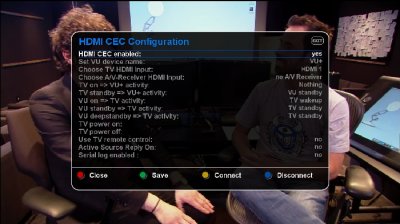
I used to be able to turn off either the tv or solo2 and have the other turn off automatically use the hdmi-cec plugin, but now it doesn't work for me. The rest of the features of the plugin I didn't use anyway.
Has anyone else got it working? Any ideas?
It's a handy must have feature to stop the family turning one off without the other. Otherwise may have to go back to bh 2.0.3.
Don't think so, like I said it was working fine, I reflashed with new version and it didn't. But I'll have a look.
Probably just bad flash or badvplugin install, when I get chance I'll backup and do clean install and just setup hdmi-cec to check it works then bit by bit install plugins I use and see if it breaks.
I do have ten or more plugins installed, and couple more than previous so maybe some odd conflict messing things up.
Lol, don't understand it but figured it out!
I had unplugged the power to my raspberry pi on hdmi 2. Powered on raspberry pi and hdmi-cec between solo2 and hdmi 1 started working as it should again!
Must of been telly misbehaving!.
I think 1.3 should be ok, but I know some hdmi cables don't work for hdmi-cec from experience.
I'm using hdmi 1.4 at the moment though and I think the solo2 comes with a hdmi 1.4 cable.
you need to configure your regza-link (toshiba's own name of hdmi-cec) in telly menu. If your cable is compatible with 1.3 format it should work with cec commands too.
This site uses cookies to help personalise content, tailor your experience and to keep you logged in if you register.
By continuing to use this site, you are consenting to our use of cookies.