Follow along with the video below to see how to install our site as a web app on your home screen.
Note: This feature may not be available in some browsers.
This board is now closed. The Blackhole image ended in 2020.
The board will remain available in Read Only Mode, so all the posts from the last 15+ years are not lost.
We thank you for being part of the community for the last 15+ years.
You can join the OpenBh board if you have not already done so at www.openbh.net.
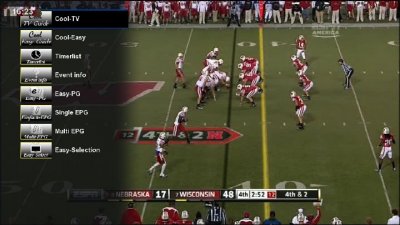
Just installed Cool TV Guide 5.0.0,
and now I have som questions for it...
1. How do I configure black hole so when I press the "EPG button", Cool TV Guide 5.0.0 start-up?
2. When I start Cool TV Guide up, it is "bigger" then the television, how do I set the size on the guide?
3. I change the path to picons to: /media/hhd/picon/ where I placed my picons, but I don't work..
Must the picons be in some folder or who ?
I have used the "Daconi Full Picons"
Firstly I would like to thank the developer of this program guide. I have owned a Vu+ for 3 months and have really struggled with the standard EPG and the need to use 'Red' Button for select etc. Having discovered Cool TV Guide only today I am now so close to a family friendly sat receiver!
I am using Cool TV V5.0 and Multiquick - My intention is to access the cool tv guide directly from a single 'short' press on the EPG button - I have mapped both EPG and EPG long to Cool TV Guide but with a short press of the EPG guide I am taken to the standard program guide and not the Cool TV Guide. On holdings the EPG button I am taken to the Cool TV Guide as expected. This seems to me to be a problem with Multiquick as if I map any other button to Cool TV Guide (green for example) I can access the Cool TV Guide perfectly.
I have a secondary problem within the Cool TV Guide. Within Cool TV Guide setup I have mapped the OK button to Zap + Exit. When I am within the Guide if I go to a channel and move forward to a time beyond the current program , press ok , the Zap and Exit function is executed - Can there be an option to prompt for 'Add Timer' 'Do Nothing' or Info under these conditions ? rather than the execution of the Zap and exit ?
Is there a way that I can rename certain attributes - For example rename 'Bouquetlist' to 'All Listings' or 'Cool Nice Guide' to Program Guide?
Another small question - is there a way from within Cool TV Guide of accessing the Timer List. If not is there a way from a single button that I can access the Timer List?
I have mapped the quick record function to the red button within Cool TV. When in the program guide I execute this function the recording of the program starts as I would expect. I do not get an option to stop recording the program, if I use the red button again the progam sometimes stops recording, soemtimes does not. If I use the Add Timer function to start a recording, I then get a Timer edit button, allowing me to stop/cancel the recording.
Is this a problem within Cool TV Guide?
I want to use Multi quickbutton on my Vu+ Duo running Black Hole 1.6.5 but need to know which is the latest version of MQB that will work on the BH image and where I can find it. I think MQB is now on version 2.7.9 or even higher, but there seems to be some special fix needed for the BH image and I have only seen that fix for older versions.
I want to use Multi quickbutton on my Vu+ Duo running Black Hole 1.6.5 but need to know which is the latest version of MQB that will work on the BH image and where I can find it. I think MQB is now on version 2.7.9 or even higher, but there seems to be some special fix needed for the BH image and I have only seen that fix for older versions.
This site uses cookies to help personalise content, tailor your experience and to keep you logged in if you register.
By continuing to use this site, you are consenting to our use of cookies.



 !
! !
!