
If you are not happy with your language translation, here is a way to modify the file enigma2.mo by yourself:
What you need :
Download and install on your PC
POEDIT (latest is 1.5.3)
NOTEPAD++
Create a folder /test on our PC
With your favourite FTP software (filezilla, Total Commander, DCC,...) transfer in the folder /test you did create on your PC the file "enigma2.mo" located on your Vuplus at :
/usr/share/enigma2/po/"your language folder"/LC_MESSAGES/
On your PC start Command Prompt
CD on the location of the /bin folder of Poedit; normally at /program files/Poedit/bin
Then type the command :
msgunfmt [location of your .mo file] > [location of where you want the .po file]
Example
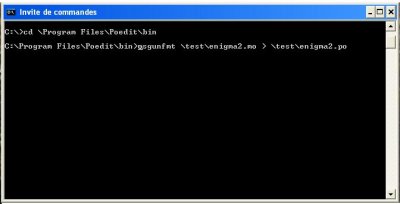
Once the enigma2.po is created:
Start Poedit, and open the enigma2.po file
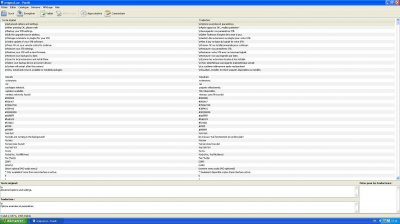
you can modify the translation.
If you wish to add new lines, you must use notepad++, and add manually the missing sections

When you save the modified enigma2.po file with Poedit, a enigma2.mo is automatically created.
Transfer on your vuplus this new enigma2.mo at
/usr/share/enigma2/po/"Your language folder/LC_MESSAGES
Restart your vuplus
Game is done...Enjoy you new translation with no mistake
What you need :
Download and install on your PC
POEDIT (latest is 1.5.3)
NOTEPAD++
Create a folder /test on our PC
With your favourite FTP software (filezilla, Total Commander, DCC,...) transfer in the folder /test you did create on your PC the file "enigma2.mo" located on your Vuplus at :
/usr/share/enigma2/po/"your language folder"/LC_MESSAGES/
On your PC start Command Prompt
CD on the location of the /bin folder of Poedit; normally at /program files/Poedit/bin
Then type the command :
msgunfmt [location of your .mo file] > [location of where you want the .po file]
Example
Once the enigma2.po is created:
Start Poedit, and open the enigma2.po file
you can modify the translation.
If you wish to add new lines, you must use notepad++, and add manually the missing sections
When you save the modified enigma2.po file with Poedit, a enigma2.mo is automatically created.
Transfer on your vuplus this new enigma2.mo at
/usr/share/enigma2/po/"Your language folder/LC_MESSAGES
Restart your vuplus
Game is done...Enjoy you new translation with no mistake