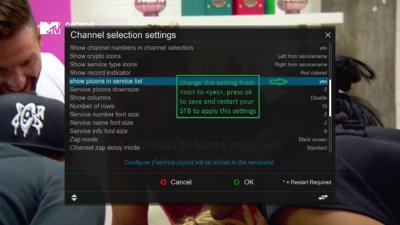
nunigaia Moderator Apr 4, 2016 #1 With the <UP> or <DOWN> arrow key's in your RCU: Open the Channel List or Services List. With it opens Press <MENU> Choose <Settings> to open Channel Selection Settings. In Channel Selection Settings, drop down on ths list until you found: ( SC_1) best regards nunigaia
With the <UP> or <DOWN> arrow key's in your RCU: Open the Channel List or Services List. With it opens Press <MENU> Choose <Settings> to open Channel Selection Settings. In Channel Selection Settings, drop down on ths list until you found: ( SC_1) best regards nunigaia