
Install the app
How to install the app on iOS
Follow along with the video below to see how to install our site as a web app on your home screen.
Note: This feature may not be available in some browsers.
This board is now closed. The Blackhole image ended in 2020.
The board will remain available in Read Only Mode, so all the posts from the last 15+ years are not lost.
We thank you for being part of the community for the last 15+ years.
You can join the OpenBh board if you have not already done so at www.openbh.net.
You are using an out of date browser. It may not display this or other websites correctly.
You should upgrade or use an alternative browser.
You should upgrade or use an alternative browser.
i need web admin plugin for solo2
- Thread starter sspol
- Start date

nunigaia
Moderator
Please attach webadmin plugin oe2
Webadmin was descontinued from long time ago!
best regards
nunigaia

AlexWilMac
Moderator
What is supposed to do this plugin that you can't do differently?

sspol
Vu+ User
It's best way for reinstall plugins...What is supposed to do this plugin that you can't do differently?
AlexWilMac
Moderator
And you make your image heavier just for that? The best way to reinstall a plugin is a couple of simple commands:
opkg remove enigma2-plugin-extensions-xxxxxxxxx
opkg install --force-reinstall enigma2-plugin-extensions-xxxxxxxxx
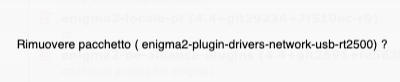
The only thing you need to know is the exact argument to pass but you have OWIF at your service to know it: you can only use it to delete a plugin but, if it doesn't, you can read what you need to pass to the command I wrote above.
opkg remove enigma2-plugin-extensions-xxxxxxxxx
opkg install --force-reinstall enigma2-plugin-extensions-xxxxxxxxx
The only thing you need to know is the exact argument to pass but you have OWIF at your service to know it: you can only use it to delete a plugin but, if it doesn't, you can read what you need to pass to the command I wrote above.
Attachments
nunigaia
Moderator
It's best way for reinstall plugins...
Why not telnet command line?
I am using WinScp, Putty, and Notepad 32 ... and it´s enought!
best regards
nunigaia
AlexWilMac
Moderator
Is what I suggested: I wrote those two commands to be used by Telnet/SSH and similar. But, in case he would be not accustomed to command line, I also suggested the OWIF feature, although I'd suggest not the delete plugin feature (because it often seems to have problem at doing it) but just to read the argument to pass to the command line "opkg remove....".
So, after all, command line and again command line is the best way.
So, after all, command line and again command line is the best way.

Thomas67
Vip
WebAdmin is in OW just open settings >> packages >> installed
Now use the search field to find the installed plugin and press the red Trashcan to remove.
Same if you want to install a plugin but now chose All instead of installed. Use search to fine the plugin or what ever and press the green floppy disc to install.
If you also open the Plugin settings through the Pluginbrowser of your Vu+ and activate ipk upload you can upload and install any .ipk file from your computer. Just chose More to find this function.
If you install shellinabox extension you also can open a terminal connection direct from OW
So no need for any Web admin plugin. OW have it all
Now use the search field to find the installed plugin and press the red Trashcan to remove.
Same if you want to install a plugin but now chose All instead of installed. Use search to fine the plugin or what ever and press the green floppy disc to install.
If you also open the Plugin settings through the Pluginbrowser of your Vu+ and activate ipk upload you can upload and install any .ipk file from your computer. Just chose More to find this function.
If you install shellinabox extension you also can open a terminal connection direct from OW
So no need for any Web admin plugin. OW have it all