
Install the app
How to install the app on iOS
Follow along with the video below to see how to install our site as a web app on your home screen.
Note: This feature may not be available in some browsers.
You are using an out of date browser. It may not display this or other websites correctly.
You should upgrade or use an alternative browser.
You should upgrade or use an alternative browser.
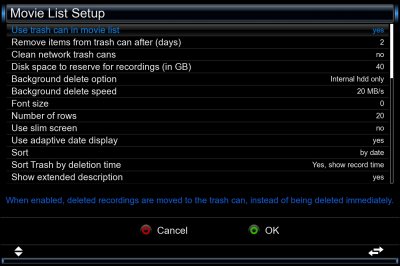
Items no longer automatically removed from trash can

AlexWilMac
Moderator
Removing items from trashcan doesn't require to remove each item one by one: if you highlight the trashcan item and press RED, it'll propose to empty it. It's a matter of two seconds, maybe more:
left cursor (to get to the top of the recording list), RED, OK
That's all: but you'll have the control over the deleting process.
left cursor (to get to the top of the recording list), RED, OK
That's all: but you'll have the control over the deleting process.
AlexWilMac
Moderator
Yes, I understood this. I was just suggesting a quick alternative because it's a matter of two seconds to empty the trashcan 
Check, by FTP or by the plugin DreamExplorer, if some orphans file are in the /media/hdd/movie folder and delete them all. Sometimes, the real recording, the .ts file, has been deleted but some other files remain as orphans and the trash appear not to be empty.
Also, as a try, disable the automatic deleting, restart the GUI and then enable it back.
Check, by FTP or by the plugin DreamExplorer, if some orphans file are in the /media/hdd/movie folder and delete them all. Sometimes, the real recording, the .ts file, has been deleted but some other files remain as orphans and the trash appear not to be empty.
Also, as a try, disable the automatic deleting, restart the GUI and then enable it back.

fta
Vu+ Newbie
I had had a look already using a secure shell but after your remark about files lingering around I found a few. Particularly files created by stream recordings. File names ending with stream.metaeit and streameit. That doesn't look good.
I deleted them and restarted the box. It will take a few days to test if it's now solved.
I deleted them and restarted the box. It will take a few days to test if it's now solved.
AlexWilMac
Moderator
Maybe if you, for the benefit of all users who might read this thread now and in the future, told us "how"...