Follow along with the video below to see how to install our site as a web app on your home screen.
Note: This feature may not be available in some browsers.
This board is now closed. The Blackhole image ended in 2020.
The board will remain available in Read Only Mode, so all the posts from the last 15+ years are not lost.
We thank you for being part of the community for the last 15+ years.
You can join the OpenBh board if you have not already done so at www.openbh.net.
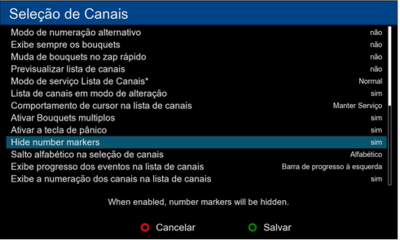
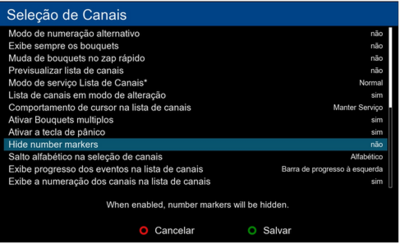
Has anyone discovered the purpose of the new option in the subject, under the Configuration menu of the channel list?
I tried both yes and no answers and my channel list didn't change.
I think the purpouse of this function comes from PLI, when enable if for any reason some of your chanels are marked n/a they will be hidden if you enable Hide Number Marks. So you want have empty channels with numbers
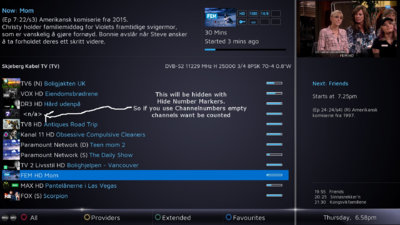
But you still have no empty channels Up here in Norway the provider changes the service id for FHD channels every 4-th month and that gives a lot of <n/a> when scannibg for new frequences.
If the option Channelnumbers is on and Hide Channel Markers is on then i dont have to scroll through several <n/a> channels but this was a PLI special and looks like the OE Alliance have adapted
this function. But still i am not 100% sure its the same function as with PLI
I have some channels n/a, but this option doesn't hide neither them nor the channel numbers (something, anyway, I don't like because is extremely useful to know them).
Then I really dont now what its for. I know that PLI hade this function but as you write. Its nice to now when something is wrong and not hide it
But thats PLIs mantra hide all errors and we doont need to fix them
This site uses cookies to help personalise content, tailor your experience and to keep you logged in if you register.
By continuing to use this site, you are consenting to our use of cookies.




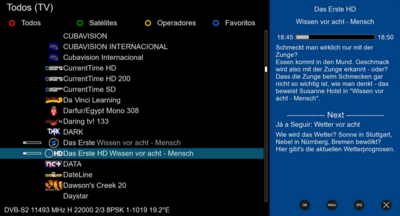
 Up here in Norway the provider changes the service id for FHD channels every 4-th month and that gives a lot of <n/a> when scannibg for new frequences.