
Install the app
How to install the app on iOS
Follow along with the video below to see how to install our site as a web app on your home screen.
Note: This feature may not be available in some browsers.
This board is now closed. The Blackhole image ended in 2020.
The board will remain available in Read Only Mode, so all the posts from the last 15+ years are not lost.
We thank you for being part of the community for the last 15+ years.
You can join the OpenBh board if you have not already done so at www.openbh.net.
You are using an out of date browser. It may not display this or other websites correctly.
You should upgrade or use an alternative browser.
You should upgrade or use an alternative browser.
parental control
- Thread starter si_1976
- Start date

supersport
Vu+ Newbie
same problem in my image last openblackhole. is possible to solve?

supersport
Vu+ Newbie
Hello, I use Vhannibal AutoSettings TRIAL, how I can load a blacklist? thanks
I managed to set pin on adult channels all you have to do is put pin on parental contro then the other 2 line press ok on the first one where it says protect service then at the bottom some where you get an option saying protect channel list you change it to yes then press green to save but it doesn't show green button option then go to channel list press menu and then you get add to parental protection optioni have switched on parental control set a pin - and you have a age restriction and have set to 18+ but can still select adult channels. is there a way to just block or set a pin on all in adult bouquet like in blackhole 2.1.5. any help would be appreciated
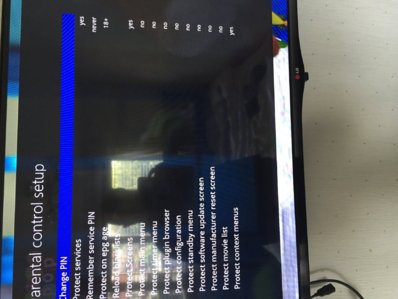
I just realised if you can just leave the change I told you then just press green button then it will put the pin on selected channel as you would on your selected channel otherwise with movie protection to yes will also put pin on your recorded files so with pic you have shown there just press green button it should solve your problem mine is fine the way I intended it to be
I just realised if you can just leave the change I told you then just press green button then it will put the pin on selected channel as you would on your selected channel otherwise with movie protection to yes will also put pin on your recorded files so with pic you have shown there just press green button it should solve your problem mine is fine the way I intended it to be
Hi thanks for your help. you are right if you switch it on it protects movie list for recorded files. i have done as you requested but when i open cooltvguide and then bouquet list and highlight a bouquet and press menu it does nothing just get a X in the top left corner. have kept settings as above jpeg, what am i doing wrong ? am i supposed to be setting it parental control somewhere else and not cooltvguide bouquet list
I don't use cool tv guide I use normal catseye bouquet channel list which you download and then I use crossepg for tv guide I cant help you on cool tv setting or parental on that all I know if you go on adult folder press menu then add parental on that folder it will add protection on all of the channels inside as well as the folder itself
I don't use cool tv guide I use normal catseye bouquet channel list which you download and then I use crossepg for tv guide I cant help you on cool tv setting or parental on that all I know if you go on adult folder press menu then add parental on that folder it will add protection on all of the channels inside as well as the folder itself
ok using crossepg - what exact button are you pressing on your remote to get to the bouquet to edit and enable parental protection i can only seem to do individual channels and not the whole bouquet itself, getting there slowly !!!!!!