Follow along with the video below to see how to install our site as a web app on your home screen.
Note: This feature may not be available in some browsers.
This board is now closed. The Blackhole image ended in 2020.
The board will remain available in Read Only Mode, so all the posts from the last 15+ years are not lost.
We thank you for being part of the community for the last 15+ years.
You can join the OpenBh board if you have not already done so at www.openbh.net.
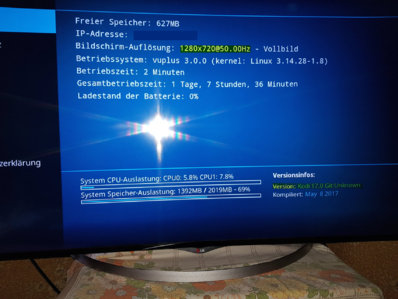
I've a Vu+ Solo 4k with BH 3.0.3 Kodi 17.0: every time I launch Kodi the resolution comes to 720p. I tried to change it in system settings / resolution but there is no way to get 1080p or 4k, only "Display Windowed" and "720p" is possible. Then when I quit Kodi, the resolution of the Vu+ remains at 720p until I restart Gui.
Can somebody tell me how to have my Kodi at least at 1080p?
Thanks
Sorry fior my late reply. Thank you but BH 3.0.3 is using Kodi 17.1 and I'm still having the poblem that I tried to explain.
Any other solution?
Best regards
No solution in sight till VU change the settings for Kodi
this is not a Image Problem it´s a VU Problem
btw it hs also not changed in the newest BH Update which called 3.0.3Q
Kodi is still at 17.1
Thank you hard driver. I'm sorry becausa I wrote 17.1 but my image has 17.0 However, what I don't understand is that there is no possibility of changinging the resolution of kodi from 720 to 1080p. Do you think it is a problem of my receiver only?
Thanks again Harddriver.
Now I tried with Open BH 1.0 (as you kindly suggested) and in fact Kodi 17.3 works at the right resolution so thank you. The only problem is that now I have some freezes and slowness in respose to commands. I'll try to understand why, If I solve this other issue I think I'll keep this image which seems nice. Thank you fopr any other suggestion should you gime me.
This site uses cookies to help personalise content, tailor your experience and to keep you logged in if you register.
By continuing to use this site, you are consenting to our use of cookies.