
Install the app
How to install the app on iOS
Follow along with the video below to see how to install our site as a web app on your home screen.
Note: This feature may not be available in some browsers.
This board is now closed. The Blackhole image ended in 2020.
The board will remain available in Read Only Mode, so all the posts from the last 15+ years are not lost.
We thank you for being part of the community for the last 15+ years.
You can join the OpenBh board if you have not already done so at www.openbh.net.
You are using an out of date browser. It may not display this or other websites correctly.
You should upgrade or use an alternative browser.
You should upgrade or use an alternative browser.
UI position setup
- Thread starter Giuffry66
- Start date

nunigaia
Moderator
Hi, is there anybody know how to manage the user interface position as using plugin IE position setup contained in BH image?
Thanks
Use the arrow buttonson your RCU --> UP/DOWN and LEFT/RIGHT ... and set it according to your TV SET. Then save your settings AFAIR, <GREEN> button.
best regards
nunigaia
nunigaia
Moderator
Hi nunigaia, if I use RCU buttons as you told me, I move thru channel list...
I thouhgt that you know yet that is avaiable a plugin named "UI position setup" to do it.
Take a look here --> http://www.vuplus-community.net/board/threads/how-to-setup-tv-and-the-osd-skin-positions.22987/
If you can´t find " OSD position setup " in Plugins Browser, you must enable first under " Black Hole Spee-Up " Menu.
1) - Press 2 X the <BLUE> button
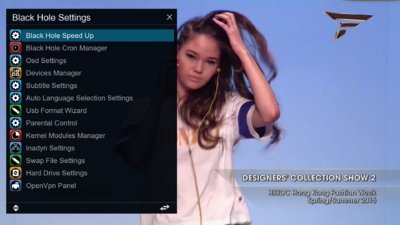
2) - Select BlacK Hole Speed Up
3) - With Left/Right arrow keys ... enable it ... and press <RED> to save and install it.
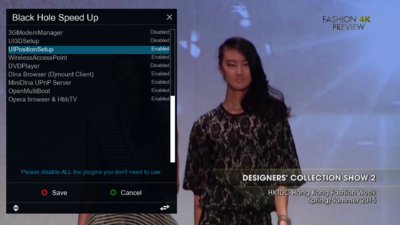
4) - Now you can get under plugins browser ... by pressing <GREEN> button ... " OSD position setup " ... as shown on the link.
best regards
nunigaia
nunigaia
Moderator
I've already read your post about OSD but in OBH 0.6 speed up option, plugin UIPosition setup is not present...
Will you please attach relative .IPK in order to install it?
Thanks and regards
No .... You don´t need it ...
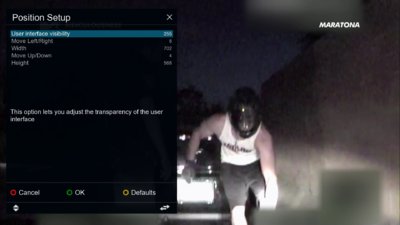
<Blue> 2 X
Enter -> Osd position Setup
Change your settings to match this ( see screenshot ) and save it with the <OK> button.
best regards
nunigaia

Giuffry66
Vu+ Newbie
Hi nunigaia, this is not what I mean.
My question is about User Interface position and not about OSD; my intention is to fit and arrange picture in my flat LCD panel.
This operation was done via UIposition Setup plugin in BH image, I wonder how to manage it in OBH 0.6 image.
Thanks and regards.
My question is about User Interface position and not about OSD; my intention is to fit and arrange picture in my flat LCD panel.
This operation was done via UIposition Setup plugin in BH image, I wonder how to manage it in OBH 0.6 image.
Thanks and regards.
nunigaia
Moderator
Hi nunigaia, this is not what I mean.
My question is about User Interface position and not about OSD; my intention is to fit and arrange picture in my flat LCD panel.
This operation was done via UIposition Setup plugin in BH image, I wonder how to manage it in OBH 0.6 image.
Thanks and regards.
This is the only way to set your OSD to fit on your TV SET.
This is severall different from Black Hole 3.0.2, where you have a guide with arrows on each corner, to adjust the screen size.
Note: Probably you must check too the "overscan " of your TV SET.
best regards
nunigaia