

zigger1_2000
Vu+ Newbie
Thanks for the site. P.S VU+DUO2 owner and very happy with BH 2.0.5
I'm developing an application to compress your .ts recordings to your PC to save room and make your recordings portable.
Contact me if you want to Alpha test or have development ideas
See screenshot.
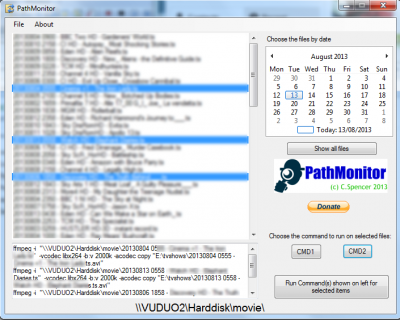
PathMonitor v1.0.0.1 Alpha
==================================================================
The example command lines were tested using ffmpeg and hanbrake
Handbrake required if used
ffmpeg required if used
the example config.xml shows handbrakeCLI being called via it's full path and ffmpeg.exe being called directly, so
it must reside in the same path as this program.
.NET 4.5 may be required
<!--
If you opened this to edit from the 'File>Edit config.xml' menu, then you must close the application
before you save this!!!
-->
example config file
<Config>
<MonitorPath>\\VUDUO2\Harddisk\movie\</MonitorPath>
<FileExtension>*.ts</FileExtension>
<strCommand>"C:\Program Files\Handbrake\HandBrakeCLI.exe" -i "[strIPath][strIFile]" -t 1 --angle 1 -c 1 -o "[strOPath][strOFile].mp4" -f mp4 -w 1920 -b 2500 --loose-anamorphic --modulus 2 -e ffmpeg4 -q 20 --vfr -a 2 -E copy:ac3 -6 auto -R Auto -B 0 -D 0 --gain 0 --audio-fallback ffac3 --markers="%temp%\markers.csv" --x264-preset=veryfast --x264-profile=main --h264-level="4.0" --verbose=1</strCommand>
<strOutputPath>E:\tvshows\</strOutputPath>
<strCommand2>ffmpeg -i "[strIPath][strIFile]" -vcodec libx264 -b:v 2000k -acodec copy "[strOPath][strOFile].avi"</strCommand2>
</Config>
I'm developing an application to compress your .ts recordings to your PC to save room and make your recordings portable.
Contact me if you want to Alpha test or have development ideas
See screenshot.
PathMonitor v1.0.0.1 Alpha
==================================================================
The example command lines were tested using ffmpeg and hanbrake
Handbrake required if used
ffmpeg required if used
the example config.xml shows handbrakeCLI being called via it's full path and ffmpeg.exe being called directly, so
it must reside in the same path as this program.
.NET 4.5 may be required
<!--
If you opened this to edit from the 'File>Edit config.xml' menu, then you must close the application
before you save this!!!
-->
example config file
<Config>
<MonitorPath>\\VUDUO2\Harddisk\movie\</MonitorPath>
<FileExtension>*.ts</FileExtension>
<strCommand>"C:\Program Files\Handbrake\HandBrakeCLI.exe" -i "[strIPath][strIFile]" -t 1 --angle 1 -c 1 -o "[strOPath][strOFile].mp4" -f mp4 -w 1920 -b 2500 --loose-anamorphic --modulus 2 -e ffmpeg4 -q 20 --vfr -a 2 -E copy:ac3 -6 auto -R Auto -B 0 -D 0 --gain 0 --audio-fallback ffac3 --markers="%temp%\markers.csv" --x264-preset=veryfast --x264-profile=main --h264-level="4.0" --verbose=1</strCommand>
<strOutputPath>E:\tvshows\</strOutputPath>
<strCommand2>ffmpeg -i "[strIPath][strIFile]" -vcodec libx264 -b:v 2000k -acodec copy "[strOPath][strOFile].avi"</strCommand2>
</Config>