Follow along with the video below to see how to install our site as a web app on your home screen.
Note: This feature may not be available in some browsers.
This board is now closed. The Blackhole image ended in 2020.
The board will remain available in Read Only Mode, so all the posts from the last 15+ years are not lost.
We thank you for being part of the community for the last 15+ years.
You can join the OpenBh board if you have not already done so at www.openbh.net.
Does anybody know where to purchase the cabels for Uno to connect the Hard Disk. The connection on the motherboard is 4 pin square. The standard SATA cable has a molex connector which is diferent.
I have searched but cannot find a cable which is 15 pin SATA to a 4 pin square connector.
Appreciate any advice on where to get the correct HDD cable for VU+ UNO.
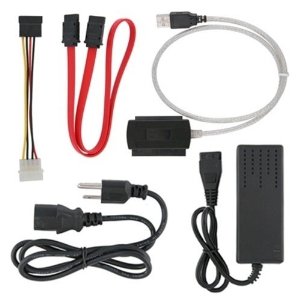
Q: "Is the cable on the top left a molex to 15 pin SATA? Is the bottom right a molex adapter?"
R: "Yes, the cable on the left is a 4pin molex to Sata connector. And yes the adapter connected to the brick is 4pin molex. So if you have a sata drive, you connect the 4pin molex from the brick to the white 4pin molex connector on the cable on the left, then the sata connector to the hard drive. The red sata cable connects to the large square connector with USB, the usb connector connect to the PC"
Thanks- I also came across this whilst searching. I do not know how to configure the above to connect to the sqaure coonector on the VU+ Uno. (scroll in link which shows a picture of the type of hard drive connector on the VU Uno). What I am wondering is: if I use a Molex to P4/64 Bit Power 4 Pin Square Connector and then LP4 To SATA 15 Pin adapter, will this work?
And if so, the P4/64 Bit Power 4 Pin Square Connector has two black and two yellow wires (no red), how do I ensure that the wires are in the correct places when I connect to the white connector in the Vu+ box.
This site uses cookies to help personalise content, tailor your experience and to keep you logged in if you register.
By continuing to use this site, you are consenting to our use of cookies.