
kostas metaxas
Vu+ Newbie
Vu+ Zero connected to TV LG42LB670 via HDMI
When I choose picture aspect ratio on TV as JUST SCAN or ORIGINAL , I get the picture with two interferences (better to say spots) in the middle of the sides of the screen, i.e I cannot lmake 1:1 pixel without interferences on the sides. Always have to switch ZOOM or FULL WIDE more to make these spots invisible (move beside of the screen). But in this cases some part of the original screen appear cutted-off
If I use 3D , then cannot mask, etc this spots at all
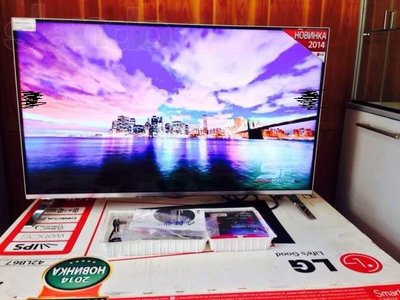
What to do?
When I choose picture aspect ratio on TV as JUST SCAN or ORIGINAL , I get the picture with two interferences (better to say spots) in the middle of the sides of the screen, i.e I cannot lmake 1:1 pixel without interferences on the sides. Always have to switch ZOOM or FULL WIDE more to make these spots invisible (move beside of the screen). But in this cases some part of the original screen appear cutted-off
If I use 3D , then cannot mask, etc this spots at all
What to do?
Last edited:

