
Install the app
How to install the app on iOS
Follow along with the video below to see how to install our site as a web app on your home screen.
Note: This feature may not be available in some browsers.
This board is now closed. The Blackhole image ended in 2020.
The board will remain available in Read Only Mode, so all the posts from the last 15+ years are not lost.
We thank you for being part of the community for the last 15+ years.
You can join the OpenBh board if you have not already done so at www.openbh.net.
You are using an out of date browser. It may not display this or other websites correctly.
You should upgrade or use an alternative browser.
You should upgrade or use an alternative browser.
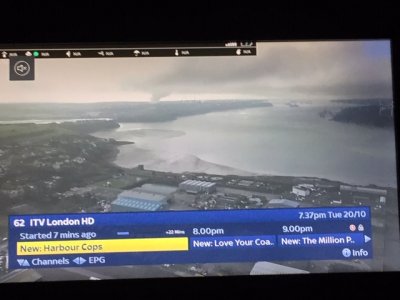
What is this menu bar and how do I turn it off?
- Thread starter gbmitie
- Start date

nunigaia
Moderator
Oops ! I mean the black menu bar at the top!!
OpenBH 4.3 don´t has such skin. Are you using one image version dowloaded from another board and not from here?
best regards
nunigaia
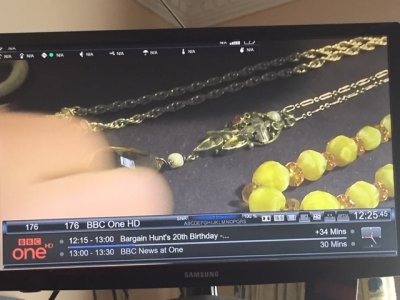
The bar at the top relates to the OPBH image, the skin is a Kiddac one adapted for OPBH. I have turned it on by accident and dont know what I did. The link for the skin was posted on here but that is a while back.
Can you see the black bar at the top? Its superimposed on the skin.
Can you see the black bar at the top? Its superimposed on the skin.
nunigaia
Moderator
The bar at the top relates to the OPBH image, the skin is a Kiddac one adapted for OPBH. I have turned it on by accident and dont know what I did. The link for the skin was posted on here but that is a while back.
Can you see the black bar at the top? Its superimposed on the skin.
Yes, I can see it, but we don´t support thirdparty skins! Sorry

best regards
nunigaia

Thomas67
Vip
Well this most surtenly a skin error. change to default OBH skin and then uninstall this skin
Reboot and after install again to see if its OK
KiddaC makes his skin for OpenATV and OpenVix and usual its me who convert them to OBH
But this slyk1 skin i have never converted so cant tell you exact whats wrong.
Reboot and after install again to see if its OK
KiddaC makes his skin for OpenATV and OpenVix and usual its me who convert them to OBH
But this slyk1 skin i have never converted so cant tell you exact whats wrong.

AlexWilMac
Moderator
First of all, please, the best way to attach a picture is not... a photo. Use the grab command: just type in a browser the box IP address followed by /grab. For instance, if your box IP is 192.168.0.33
192.168.0.33/grab
and then save (right click) the picture you got.
This will also avoid to attach a rotated picture and the picture will be perfect, not just a more or less blurred photo.
Second: if this bar does not pertain to the skin, is surely some dirty plugin you installed. Which one, only you might know.
192.168.0.33/grab
and then save (right click) the picture you got.
This will also avoid to attach a rotated picture and the picture will be perfect, not just a more or less blurred photo.
Second: if this bar does not pertain to the skin, is surely some dirty plugin you installed. Which one, only you might know.
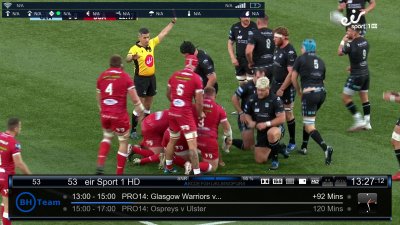
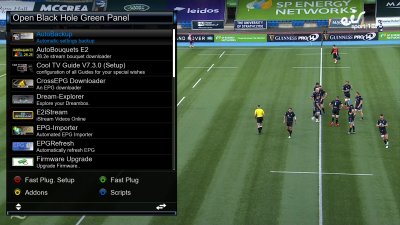
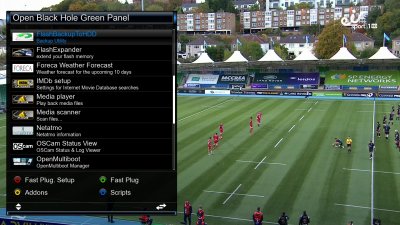
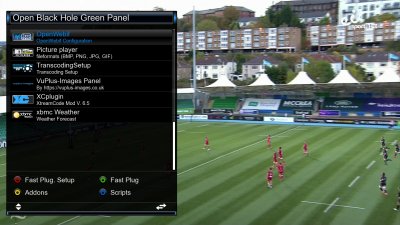
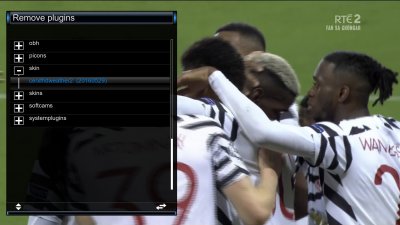
Well I never knew that nifty trick here is a better pick. Is there any way I can look at all plugins other than plugins, here are the pics!! And thank for that tip, its a look time since I dabbled with images but on lockdown for next 6 weeks so will have a play. The box is for a family hence the skin.
Attachments
nunigaia
Moderator
Its a weather component at the top with some more widgets added how did you remove the xbmc weather plugin??
You can also check the addons uninstall panel by pressing Green Button and then yellow button, scroll down to uninstall and see if you have any weather widgets installed direct into the image
Now, this enough!
If you know how using command line ( linux ) telnet just do it, as:
After enter your credentials, at command line, please type the following, or just copy paste my lines:
1) Removing plugin:
Code:
opkg remove enigma2-plugin-skin-cerxfhdweather22) Restart your STB:
Code:
rebootNote: Please, reply if you are succeeded! Otherwise, as @Thomas67 has recommend you, reflash your STB.
best regards
nunigaia
nunigaia
Moderator
thanks all, now doing a re-flash. And watching Real Madrid!!
How can you do it at the same time, it was helpfull!
thanks anyway
best regards
nunigaia
Note: Next time, if you dont´t know, what´s the plugin is for, ask it first, or don´t install it!
