
Install the app
How to install the app on iOS
Follow along with the video below to see how to install our site as a web app on your home screen.
Note: This feature may not be available in some browsers.
- Home
- Forums
- Black Hole (Archive)
- Blackole Support (Discontinued)
- Vu+ Hardware
- Hardware: All Vu+ models
You are using an out of date browser. It may not display this or other websites correctly.
You should upgrade or use an alternative browser.
You should upgrade or use an alternative browser.
Can not flash from USB drive
- Thread starter jwlalek
- Start date


nunigaia
Moderator
Thanks. I will try another one when I'll buy it.
1) - turn off duo2 rear power button
2) - Disconnect all your usb devices, usb pen, usb tunners, hdd usb, etc..
Put the stick ( Usb Pen Drive) tha contain the image you want upgrade on your usb front port
Turn your STB on rear power button
press power button, on front panel " on msg display ", to update your STB ... until said finished!
Best regards
nunigaia

Tony il Capo
Vu+ Newbie
That used to happen to me all the time, with my old box and also with my Duo2 right at the very first time I've tried to flash an image. Also there was no "Update" message in vdf...
Then I read somewhere to format drive using HP Format Tool and it worked for me.
I recommend you try it before you buy another flash drive.
Then I read somewhere to format drive using HP Format Tool and it worked for me.
I recommend you try it before you buy another flash drive.
nunigaia
Moderator
That used to happen to me all the time, with my old box and also with my Duo2 right at the very first time I've tried to flash an image. Also there was no "Update" message in vdf...
Then I read somewhere to format drive using HP Format Tool and it worked for me.
I recommend you try it before you buy another flash drive.
I never used Hp format tool - Allways used format command windows 7 or Vista or Xp -- FAT32 with USB Pen Drives from 2, 4, 8 an 16Gb, but allways sandisk or tanscend, never missed an update!
Tony il Capo
Vu+ Newbie
I never used Hp format tool - Allways used format command windows 7 or Vista or Xp -- FAT32 with USB Pen Drives from 2, 4, 8 an 16Gb, but allways sandisk or tanscend, never missed an update!
I've never tried format via command, always used windows 'normal' format window and never worked for me. The box reads usb, but update message never shows up and the stb just hangs there or sometimes continues to normal boot.
nunigaia
Moderator
I've never tried format via command, always used windows 'normal' format window and never worked for me. The box reads usb, but update message never shows up and the stb just hangs there or sometimes continues to normal boot.
I don´t said that i format via command --> as you now copy, format, rename, etc are windows commands.
I use format command on Windows environment not in DOS command, or command line.
See the sequence:
Scr 1
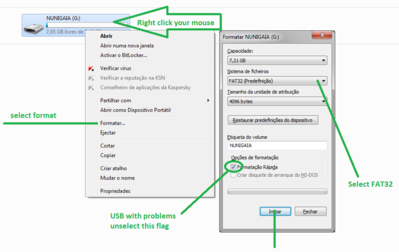
Scr 2

best regards
nunigaia
Last edited:
Tony il Capo
Vu+ Newbie
Sorry, I thought you were saying windows/dos cmd...
Exactly what I did many times, never worked, only formatting via HP Format Tool worked for me, not sure why.
Exactly what I did many times, never worked, only formatting via HP Format Tool worked for me, not sure why.

nunigaia
Moderator
It's working now. I found my another USB drive, this one never let me down, it's 8GB Patriot Exporter 2.0 USB. The other two: Lexar 3.0 USB 32GB and SanDisk Cruze Force 2.0 USB 8GB don't work with my box anymore. Thanks for all your comments and help.
The Usb ports on duo2 are all 2.0 ( 3 ports ), so if you are using 3.0 devices maybe the issues you have, is regarding this.
All my devices are 2.0, and i have used 2.0 16Gb without any issues!
best regards
nunigaia

jwlalek
Vu+ User
so if you are using 3.0 devices maybe the issues you have, is regarding this.
The SanDisk one is USB 2.0, maybe something just happened to it and stopped working with my box.